 Back to templates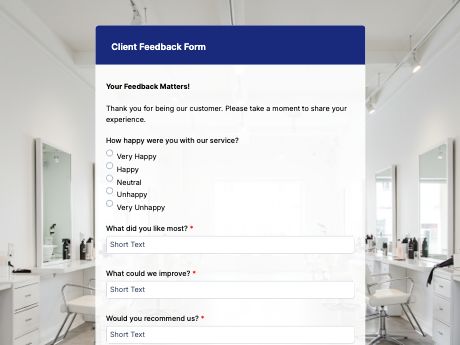
Client Feedback Form Template
Tags/categories: Feedback Forms
What is a client feedback form?
A client feedback form is a short online form that asks for clients' satisfaction with a project output or service results. This form includes rating fields for communication, quality, and results. So, instead of a quick call or a vague "everything's good" email, you get clear answers your team can track and act on.
Customize this template to fit the services you offer, then when a project ends, share it as a QR code on invoices, in a follow-up email, or on a printed thank-you card.
Every answer saves to your TIGER FORM account, so you can check client satisfaction across all your projects in one place.
Get started with the Client Feedback template, or build your own feedback form from scratch with TIGER FORM's AI form builder.
Benefits of this template
structured ratings make it easy to spot what's working and where client relationships need attention.
a quick, mobile-friendly form gets more replies than a follow-up phone call or long email survey.
every response is stored digitally and searchable, so feedback doesn't get lost in inboxes.
asking for feedback shows clients their input matters, building trust for future work.
collected data is ready to review or share with your team without manual compilation.
Fields
This client feedback template is a standard client satisfaction form with fields such as:
Start customizing this Client Feedback Form Template in TIGER FORM
Best for
This template works for any business that wants direct feedback from the clients it serves.
Industries Use Case
Client feedback needs to shift depending on the type of business, but every service provider benefits from hearing directly from clients.
Ask clients how well you communicated and delivered results, so you can spot what's working and fix what isn't before the next project.
Send a short feedback form after each job to collect quotes you can use as testimonials and to catch problems early, before they cost you repeat clients.
Ask users about service and support to find out which features or fixes to work on next.
Others (Hows and Tips)
How to create a client feedback form with TIGER FORM?
Start by using this template, refine to match your branding and needs.
Or go to TIGER FORM's online form builder and click on the “Forms” tab to build your forms from scratch.
Add or edit fields such as ratings, project details, and comments using the drag-and-drop builder.
Customize the form's design elements to match your brand.
Preview the form on both desktop and mobile to check for errors.
Generate a QR code linked to your form and customize its design if needed.
Share the form QR code in follow-up emails, on invoices, or after a project wraps up.
Tips on creating a client feedback form
- Keep the form simple and short so clients are more likely to avoid survey fatigue and complete it.
- Use rating scales for specific areas, like communication or results, so feedback is easy to compare across clients.
- Add an open comments field where clients can share the reasons for their ratings, because numerical ratings alone won't capture the whole essence of the feedback.
- Send the form right after a project ends, while the experience is still fresh.
- Test the form on mobile, since many clients will fill it out on their phone.
FAQs about the client feedback form
A client feedback form collects a client's satisfaction with your service or project, covering communication, quality, and overall experience. It provides businesses with structured data they can use to identify gaps, improve client relationships, and refine service delivery for future projects.