 Back to templates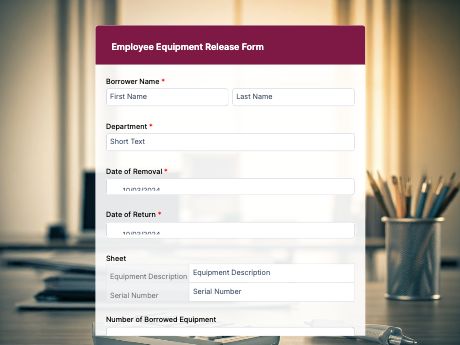
Employee Equipment Release Form
Tags/categories: Employment Forms
What is an employee equipment release form?
An employee equipment release form documents company-issued equipment to an employee, from laptops to tools to uniforms, so both parties have a clear record of what was handed out, when, and in what condition.
Instead of tracking equipment through emails or a shared spreadsheet that's easy to lose track of, HR and IT teams get a signed record for every item that leaves the office.
You can modify this template to your brand's needs. And with TIGER FORM's QR code generation, share its QR code during onboarding, at the equipment storage room, or through your HR portal. Every submission is stored in your TIGER FORM account, so you always know who has what.
Add fields for item serial numbers, condition notes, or return dates, and include a signature field so employees formally acknowledge responsibility for the equipment. Get started with this template, or build your own HR form from scratch with TIGER FORM's AI form builder.
Benefits of this template
a signed record means there's no confusion over who has which piece of equipment.
tracking issued equipment digitally makes it easier to follow up when items aren't returned.
organized fields mean HR or IT can log a release in seconds instead of updating a spreadsheet by hand.
every release is stored digitally and searchable, ready for audits or offboarding checks.
a clear equipment record makes it simple to check what needs to be returned when an employee leaves.
Fields
This employee equipment release template is a standard equipment tracking form with fields such as:
Start customizing this Employee Equipment Release Form template in TIGER FORM
Best for
This template works for any business that issues equipment to employees and needs a clear record of it.
Industries Use Case
Equipment release needs to shift depending on what a business issues, but every company benefits from a clear paper trail.
IT departments use the form to track laptops, monitors, and other devices issued to new hires.
Businesses use it to log uniforms, POS devices, or other operational equipment given to staff.
Companies track tools and safety equipment issued to workers on different job sites.
Others (Hows and Tips)
How to create an employee equipment release form with TIGER FORM?
Use this form template for an employee equipment release, or go to TIGER FORM and start from scratch.
Add or edit fields such as equipment description, serial number, and release date using the drag-and-drop builder.
Customize the form's design to match your company branding.
Preview the form on both desktop and mobile to check for errors.
Generate a QR code linked to your form and customize its design if needed.
Share the QR code form during onboarding or at the equipment storage room.
Tips on creating an employee equipment release form
- Include a field for serial or asset numbers so each item can be tracked individually.
- Add a condition notes field to document the equipment's condition at release and return.
- Require a signature field so employees formally acknowledge responsibility.
- Set an expected return date field for equipment that isn't permanently assigned.
- Keep an online copy on file for easy reference during offboarding.
FAQs about the employee equipment release form template
It's a form that documents equipment issued to an employee, providing both parties with a clear, signed record of what was issued and when.