 Back to templates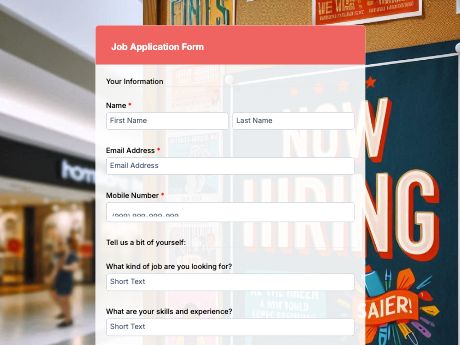
Job Application Template for Employment Hiring
Tags/categories: Application Forms
What is a job application form?
A job application form gathers consistent, structured information from every job applicant, with fields depending on the role being applied to. It is the first checkpoint for evaluating who's worth a second look for a job position.
With an online job application form, you skip the pile of paper resumes and scattered email attachments, and instead get every applicant's details, work history, and qualifications organized in one place.
Customize this template to match the role you're hiring for, share it as a QR code on your careers page, job posting, or printed flyer, and watch responses roll in to your TIGER FORM account as candidates apply.
Generate a branded QR code so candidates can scan and apply straight from a poster, business card, or job fair booth, and review submissions on any device in real time. Get started with the Job Application template, or build your own hiring form from scratch with TIGER FORM's AI form builder.
Benefits of this template
every candidate answers the same questions, so you can compare applicants side by side instead of piecing together different resume formats.
See each candidate's skills, availability, and experience right away, so you can pick who to interview without opening every file.
All submissions are saved in one place. You can search for them or download them anytime, instead of digging through your inbox.
share the form as a link or QR code on a job posting, careers page, or flyer, so applicants can apply in seconds from their phone.
required fields make sure you're not left chasing candidates for missing info.
Fields
This job application template is a Standard job application form with fields such as:
Start customizing this Job Application Form template in TIGER FORM
Best for
This template works for anyone responsible for bringing in new hires, whether you're running a single opening or a high-volume hiring push.
Industries Use Case
Job application forms look a little different depending on the industry, but the goal is always the same: capture the right details fast so you can move qualified candidates forward.
High-volume, high-turnover hiring means recruiters need a fast, mobile-friendly form that applicants can fill out on a QR code scan in-store.
Some healthcare jobs need proof of license or certification right away, so the form should have a spot for uploading these documents.
Hiring managers rely on resume uploads, cover letters, and structured questions to screen candidates before interviews.
Others (Hows and Tips)
How to create a job application form with TIGER FORM?
Go to TIGER FORM's online form builder and select the job application template, or start from scratch.
Add or edit fields such as contact details, work experience, and skills using the drag-and-drop builder.
Customize the form's design to match your company branding.
Preview the form on both desktop and mobile to check for errors.
Generate a QR code linked to your form and customize its design if needed.
Embed the QR code on job postings, your careers page, or printed materials.
Tips on creating a job application form
- Keep your form short and ask only for what you need to make a hiring decision.
- Group related fields together so the form feels organized, not overwhelming.
- Mark optional fields clearly so applicants know what's required.
- Test the form on mobile before sharing, since most applicants apply from their phones.
- Add a file upload field so resumes come in alongside the form data.
FAQs about the job application form template
Full name, contact details, work experience, skills summary, availability, resume upload, and a signature or certification field.