 Back to templates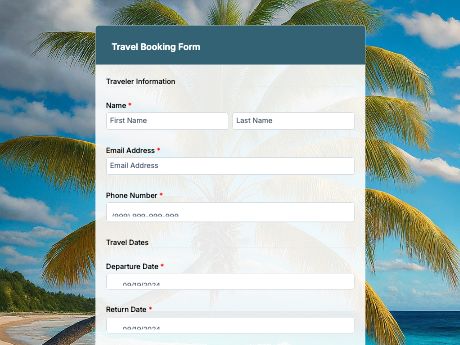
Travel Booking Form Template with QR Code
Tags/categories: Reservation Forms
What is a travel booking form?
A travel booking form lets tourists request or schedule a trip by sharing their travel details, preferences, and payment info in one place. Instead of managing bookings through back-and-forth emails or phone calls, travel agencies and tour operators get every request organized and ready to process.
Customize the template to match the trips or packages you offer, then share it as a QR code on your website, brochures, travel fairs, or in-store displays.
Add fields for travel dates, destination preferences, number of travelers, or add-on services, and set up alerts so your team can respond to new bookings fast. Generate a QR code that travelers can scan from a brochure or poster to start booking on their own device.
Get started with the Travel Booking template, or build your own booking form from scratch with TIGER FORM's AI form builder.
Benefits of this template
properly structured fields of a booking form let your travel agents confirm trips without back-and-forth emails over missing details.
typed travel dates and traveler details replace handwritten or verbally relayed info that's easy to get wrong.
every booking request for trips is digitally contained and searchable, instead of scattered across emails and calls.
travelers can book anytime, from any device, without waiting for office hours.
add-on fields for tours, insurance, or upgrades let travelers customize their trip right from the form.
Fields
This travel booking template is a standard travel and tour booking form with fields such as:
Start customizing this Travel Booking Form template in TIGER FORM
Best for
This template works for any business that takes trip or tour bookings and wants to skip the manual back-and-forth.
Industries Use Case
Travel booking forms adjust depending on what's being booked, but every business needs the same core info to confirm a trip.
Booking forms, especially for trips, should ask for the destination, travel type, and headcount to make it easier to match travelers with the right trip.
Extra fields for tours, transportation, or gear rentals make it easier to plan the details.
Booking forms should include travel dates and room choices so you can confirm availability fast.
Others (Hows and Tips)
How to create a travel booking form with TIGER FORM?
Select this trip booking form or go to the TIGER FORM and start from scratch.
After, add or edit fields such as travel dates, destination, and traveler details using the drag-and-drop builder.
Customize the form's design to match your agency's branding.
Preview the form on both desktop and mobile to check for errors.
Generate a QR code linked to your form and customize its design if needed.
Share and embed the generated QR code on your website, brochures, or at travel fairs.
Tips on creating a travel booking form
- Ask for travel itinerary like dates and the number of travelers upfront so your team can check availability right away.
- Add a field for destination or package selection to assign requests to the right team member.
- Include an add-on services field so travelers can customize their trip without a separate follow-up.
- Test the form on mobile, since many travelers will book while browsing on their phone.
- Add a special requests field for dietary needs, accessibility, or other preferences.
FAQs about the travel booking form template
It's a form travelers use to submit trip details and preferences directly to a travel agency or operator, replacing manual emails and phone calls with a single, organized request.