 Back to templates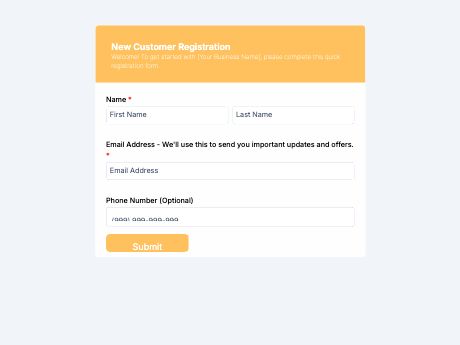
New Customer Registration Form Template
Tags/categories: Registration
What is a new customer registration form?
A new customer registration form collects a first-time user's contact info, preferences, and account details when they sign up on your website. Instead of messy notes from a phone call or a paper sign-up sheet, you get one clean form with everything you need to onboard them.
You can adjust this template for your business, then share it as a QR code at your store, on receipts, or in welcome emails. Every submission goes straight to your TIGER FORM account, ready to use for support, billing, or marketing.
Add fields for service preferences, communication preferences, or marketing consent, and set up your form to build an organized customer record from day one. Generate a QR code that new customers can scan in-store or on packaging to register on the spot. Get started with the New Customer Registration template, or build your own customer form from scratch with TIGER FORM's AI form builder.
Benefits of this template
every sign-up is stored digitally and searchable, instead of scattered across notebooks or spreadsheets.
clean, structured fields mean new clients are ready to serve as soon as they submit the form.
service and communication preferences let you tailor support and marketing from the first interaction.
typed details replace handwritten sign-up sheets that are easy to misread.
a built-in consent field documents customer agreement for marketing or data use.
Fields
This new customer registration template is a standard customer sign-up form with fields such as:
Start customizing this New Customer Registration Form template in TIGER FORM
Best for
This template works for any business that wants an organized way to onboard new customers.
Industries Use Case
New customer registration needs vary by business, but every company benefits from starting with clean, structured customer data.
Businesses use registration data to power loyalty programs and personalize future offers.
Preference fields help match customers with the right service tier or support team from the start.
Registration forms often need extra fields for account verification and compliance documentation.
Others (Hows and Tips)
How to create a new customer registration form with TIGER FORM?
Go to TIGER FORM's online form builder and select the new customer registration template, or start from scratch.
Add or edit fields such as contact details, preferences, and consent using the drag-and-drop builder.
Customize the form's design to match your business branding.
Preview the form on both desktop and mobile to check for errors.
Generate a QR code linked to your form and customize its design if needed.
Share the QR code and add it on your website, receipts, or at your storefront.
Tips on creating a new customer registration form
- Keep the form simple and short , only ask for the details you'll actually use.
- Add a consent field so customers can opt in to marketing or data use clearly.
- Include a preferences field to personalize service or communication from the start.
- Test the form on mobile, since many customers will sign up from their phone.
- Set up alerts so your team members can follow up with new customers right away.
FAQs about the new customer registration form template
It's a form that collects a new customer's contact details and preferences, giving your business an organized record from the first interaction, rather than scattered notes.