 Back to templates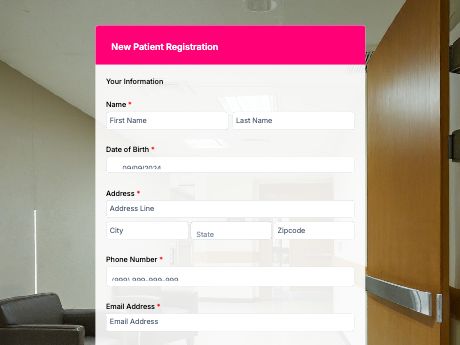
New Patient Registration Form Template
Tags/categories: Registration
What is a new patient registration form?
A new patient registration form collects a patient's personal, medical, and insurance details before their first visit, so clinic staff have everything on hand before the appointment starts.
Instead of handing new patients a clipboard in the waiting room, they fill out one structured form online, ahead of time or right at check-in, and the details go straight into your system.
Customize this form template and complement your practice's intake process, then share it as a QR code at reception, in appointment confirmations, or in welcome emails. Responses are then flowed to your dashboard, ready for your front desk to review before the patient arrives.
Use this patient registration template, or build your own intake form from scratch with TIGER FORM's AI form builder.
Benefits of this template
typed responses replace illegible handwriting, so staff spend less time chasing down unclear entries.
patients arrive with registration already done, and with this, the front desk staff can proceed with them on the next processes faster.
allergies, medical history, and insurance details are on hand before the appointment starts.
every submission is stored digitally and searchable, instead of scattered across paper intake sheets.
registering from home means less time spent and the hassle of filling out forms in the hospital.
Fields
This new patient registration template is a standard patient intake form with fields such as:
Start customizing this New Patient Registration Form Template in TIGER FORM
Best for
This template works for any healthcare practice that wants new patients registered before they walk in.
Industries Use Case
There is a need for changes in patient registration depending on the practice, but every clinic benefits from accurate details before the first visit.
Online forms that register new patients require detailed insurance and referral fields to prep billing ahead of the visit.
Check-in moves fast, so the form should be short and easy to fill out on a phone.
Forms may need extra fields for referral info and past treatment, so specialists know what to expect before the visit.
Others (Hows and Tips)
How to create a new patient registration form with TIGER FORM?
Go to TIGER FORM's online form builder and select the new patient registration template, or start from scratch.
Add or edit fields such as medical history, insurance details, and emergency contacts using the drag-and-drop builder.
Customize the form's design to match your practice's branding.
Preview the form on both desktop and mobile to check for errors.
Generate a QR code linked to your form and customize its design if needed.
Share QR code on appointment confirmations, your website, or at reception.
Tips on creating a new patient registration form
- Label the important and required fields clearly, most especially medical history and emergency contacts.
- Group fields by category (personal info, medical history, insurance) so the form doesn't feel overwhelming.
- Add a consent field so patients acknowledge treatment and data privacy terms during submission.
- Send the form ahead of the appointment so patients can complete it from home.
- Test the form on mobile, since many patients will register from their phone.
FAQs about the new patient registration form template
It's a form that collects a patient's personal, medical, and insurance details before their first visit, so clinic staff are prepared before the appointment starts.